A&I EHR Mobile App Used by 95% of Clinical Staff
How A&I Solutions enabled secure interoperability between a custom EHR and Epic using FHIR APIs, improving clinical data exchange and care coordination.
Contact Us
Connecting healthcare systems through FHIR interoperability
The client needed to exchange patient information between its custom EHR and Epic while eliminating duplicate data entry and improving continuity of care. Manual workflows delayed referrals, laboratory updates, and clinical decision-making.
A&I Solutions implemented secure FHIR-based interoperability, enabling real-time clinical data exchange between both platforms without disrupting existing workflows.
Enabling real-time interoperability
The Challenge
- Duplicate clinical documentation.
- Delayed referral information.
- Limited interoperability with Epic.
Our Solution
- FHIR API integration.
- SMART on FHIR authentication.
- Automated clinical data synchronization.
Standards-based interoperability platform
A&I Solutions developed an API orchestration layer using FHIR R4, SMART on FHIR, OAuth 2.0, Azure API Management, and HL7 v2.x interfaces. Clinical encounters, medications, allergies, laboratory results, referrals, and demographics synchronized securely between Epic and the custom EHR while maintaining complete audit trails.
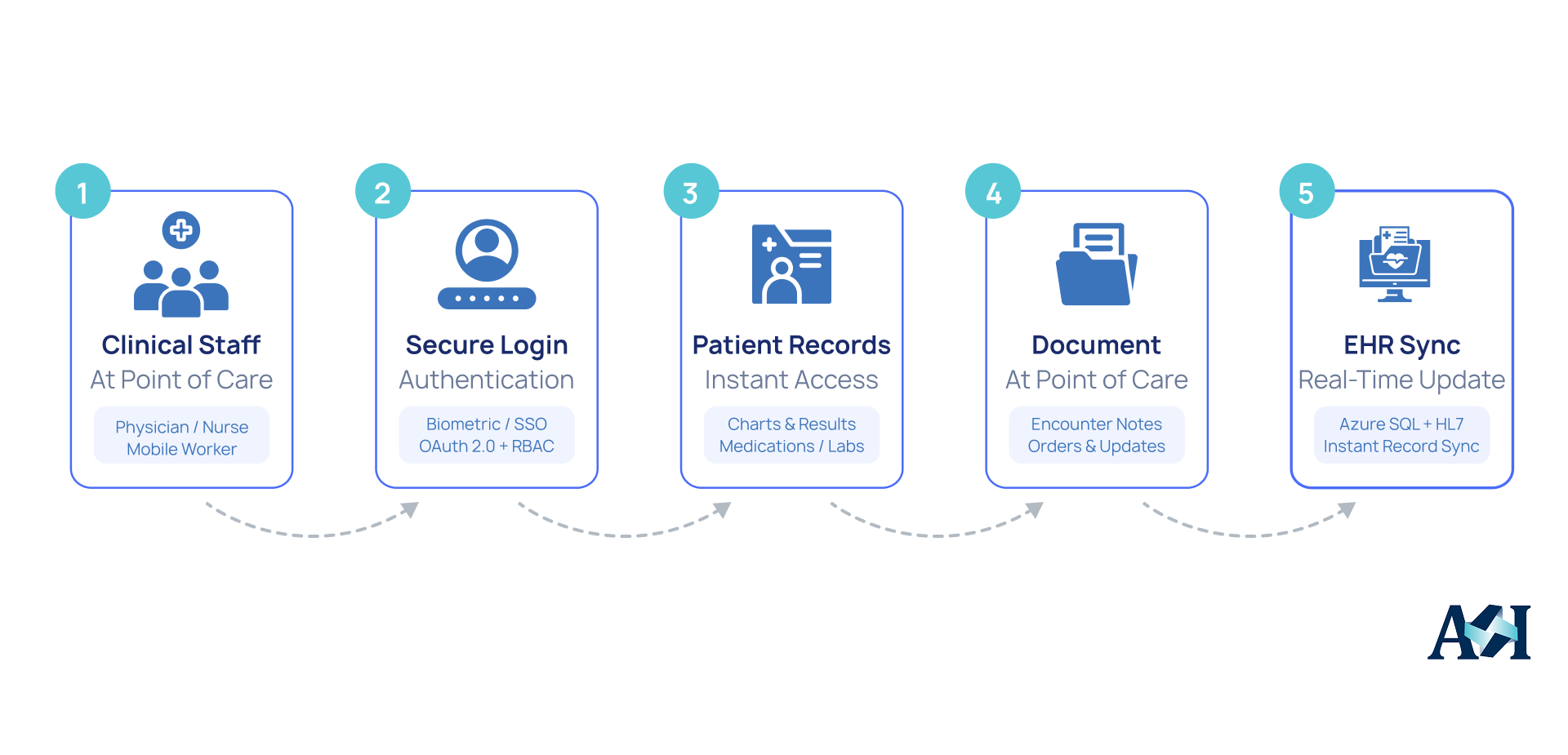
EHR development for secure mobile clinical workflows
A&I Solutions designed and developed a native mobile application that extended the organization’s EHR development strategy beyond desktop workstations. The application provided clinicians with secure, real-time access to patient records, documentation, schedules, and clinical results directly from mobile devices, enabling efficient point-of-care workflows across multiple clinic locations.
Through these A&I EHR development outcomes, the project demonstrates how custom EHR development can improve clinical mobility, increase staff adoption, and streamline healthcare operations.
1. Native mobile clinical experience
To improve clinician adoption, A&I Solutions built a mobile-first application designed specifically for healthcare workflows rather than adapting the desktop interface.
- Native iOS and Android applications
- Mobile-optimized chart review and clinical documentation
- Real-time patient schedules and results access
- Fast navigation designed for point-of-care use
2. Connected mobile healthcare platform
The application synchronized clinical information across mobile and desktop environments while maintaining enterprise-grade security.
FHIR R4 APIs and HL7 v2.x messaging synchronized patient records, documentation, scheduling, and clinical results instantly across all devices.
Clinicians documented encounters, reviewed charts, and accessed patient information without returning to shared workstations.
Secure access across exam rooms, departments, and multiple clinic locations supported continuous clinical workflows throughout the day.
Microsoft Azure, SMART on FHIR, OAuth 2.0, Single Sign-On (SSO), Role-Based Access Control (RBAC), biometric authentication, encrypted data transmission, and HIPAA-compliant audit logging protected patient information while ensuring secure mobile access.